
What Are AI Agents? How to Build One for Your Business in 2026
AI agents are software systems that perceive context, reason over goals, use tools, and take action with minimal human intervention. This guide explains how they work, where they create ROI, and how to build one the right way in 2026.
What Are AI Agents?
An AI agent is a software system that pursues goals on your behalf. Unlike a simple chatbot that only generates text, an agent can observe context, decide what to do next, call tools or APIs, remember prior steps, and loop until the task is complete — with humans involved only when judgment or approval is required.
In 2026, most business-ready agents combine a large language model (LLM) for reasoning with a structured runtime for actions: reading documents, updating a CRM, querying a database, sending notifications, or escalating to a person. The agent is not the model alone — it is the full loop of perceive → plan → act → verify.
Teams adopt agents when repetitive knowledge work has clear rules but too many exceptions for rigid automation. Think invoice intake, compliance review, sales research, customer support triage, or internal ops workflows where a copilot alone would still leave someone clicking through five systems.
If you are evaluating agents for production, start with a workflow that has measurable pain: hours spent per week, error rate, or deal velocity. That discipline separates a useful agent from a demo that never ships.
The phrase AI agent is often confused with generic ChatGPT usage. A browser chat session without tools or memory is not an agent in the production sense. Business agents are embedded in your stack, authenticated as a service principal or user, and accountable through logs and approvals.
In 2026, buyers ask harder questions: Can we replay a failed run? Who approved this action? Which data left our tenant? Can we turn autonomy down without redeploying code? Mature agent programs answer yes before expanding scope.
Governance is not optional for B2B buyers. Legal, security, and procurement will ask how agents differ from shadow IT scripts. A clear architecture diagram, data flow map, and rollback plan accelerate approval more than another benchmark slide.
How AI Agents Work
At a high level, every agent needs four capabilities: perception (inputs like emails, PDFs, tickets, or database rows), memory (short-term conversation state plus longer-term business context), reasoning (the LLM or rules engine choosing the next step), and action (tool calls with guardrails).
A typical execution loop looks like this: the user or system triggers a task; the agent gathers relevant context through retrieval or API calls; the model proposes a plan or next action; the runtime validates permissions and safety constraints; the tool runs; results are written back to memory; the loop continues until the task reaches a done state or hits a human-in-the-loop gate.
Reliable agents add observability at every step — structured logs, confidence scores, latency metrics, and replayable traces. Without that, debugging a failed run in production becomes guesswork. Production teams also version prompts, tool schemas, and evaluation sets so changes do not silently degrade quality.
Retrieval-augmented generation (RAG) is often part of the perception layer: the agent pulls the right policy doc, contract clause, or product spec before acting. For regulated workflows, retrieval boundaries matter as much as model choice — the agent should only see data it is allowed to use.
Memory deserves explicit design. Short-term memory holds the current run — tool outputs, intermediate classifications, and user corrections. Long-term memory might store embeddings, customer preferences, or prior decisions — always with retention policies. Mixing the two without guardrails creates leakage risk and stale recommendations.
Finally, agents fail gracefully or they fail expensively. Timeouts, circuit breakers, dead-letter queues, and default escalation paths should be first-class — not afterthoughts once a demo works on ten happy-path examples.
- Trigger: webhook, queue message, schedule, or user request
- Context: RAG, database lookups, and prior run history
- Decision: LLM plan or graph node transition
- Action: API call, document parse, classification, or notification
- Verification: rules engine, second model pass, or human approval
Types of AI Agents
Not every agent needs the same architecture. Matching the type to the workflow keeps cost and risk under control.
Single-agent designs are enough when one model call plus one or two tools solves the job — for example, classify this ticket and route it. Multi-agent designs earn their complexity when specialists outperform a single generalist prompt, or when parallel work reduces latency.
The most common mistake is jumping to multi-agent orchestration before a single-path prototype proves value. Start simple, measure, then split roles only when evals show a bottleneck.
- Reactive agents respond to a single input with one structured output — useful for classification, extraction, or summarization with no multi-step plan.
- Tool-using agents call external systems through defined functions — search, CRM updates, spreadsheet writes, or payment lookups.
- Multi-step workflow agents follow a directed graph of steps with branches, retries, and fallbacks — common in operations and finance.
- Multi-agent systems delegate subtasks to specialized agents — for example, intake, validation, routing, and approval as separate nodes.
- Human-in-the-loop agents pause for review when confidence is low, amounts exceed thresholds, or policy requires sign-off.
- Autonomous research agents gather information across sources and synthesize reports — popular in sales and strategy, but need strict source citation and rate limits.
AI Agent Use Cases by Industry
Agents create the most value when they remove handoffs between systems and reduce rework — not when they merely draft emails faster.
In financial services and FinTech, agents accelerate KYC document intake, flag anomalies against policy rules, and prepare compliance summaries for analyst review. Human reviewers stay in the loop; the agent removes the copy-paste between PDFs, spreadsheets, and core systems.
B2B SaaS teams use agents for onboarding orchestration, usage anomaly detection, churn risk summaries, and tier-one support triage grounded in help-center content. The agent deflects repetitive tickets while escalating edge cases with full context.
Healthcare and life sciences workflows benefit from agents that extract structured fields from clinical or operational documents — always with audit trails and strict access controls. Autonomy is intentionally limited; accuracy and traceability come first.
E-commerce and marketplaces deploy agents for catalog enrichment, seller support, fraud signal triage, and returns processing. Mobile-first operations often pair agents with customer-facing apps that need real-time inventory and notification flows.
Professional services and agencies use agents for proposal research, SOW drafting from templates, resource scheduling, and project status rollups. The win is consistent quality at scale, not replacing domain expertise.
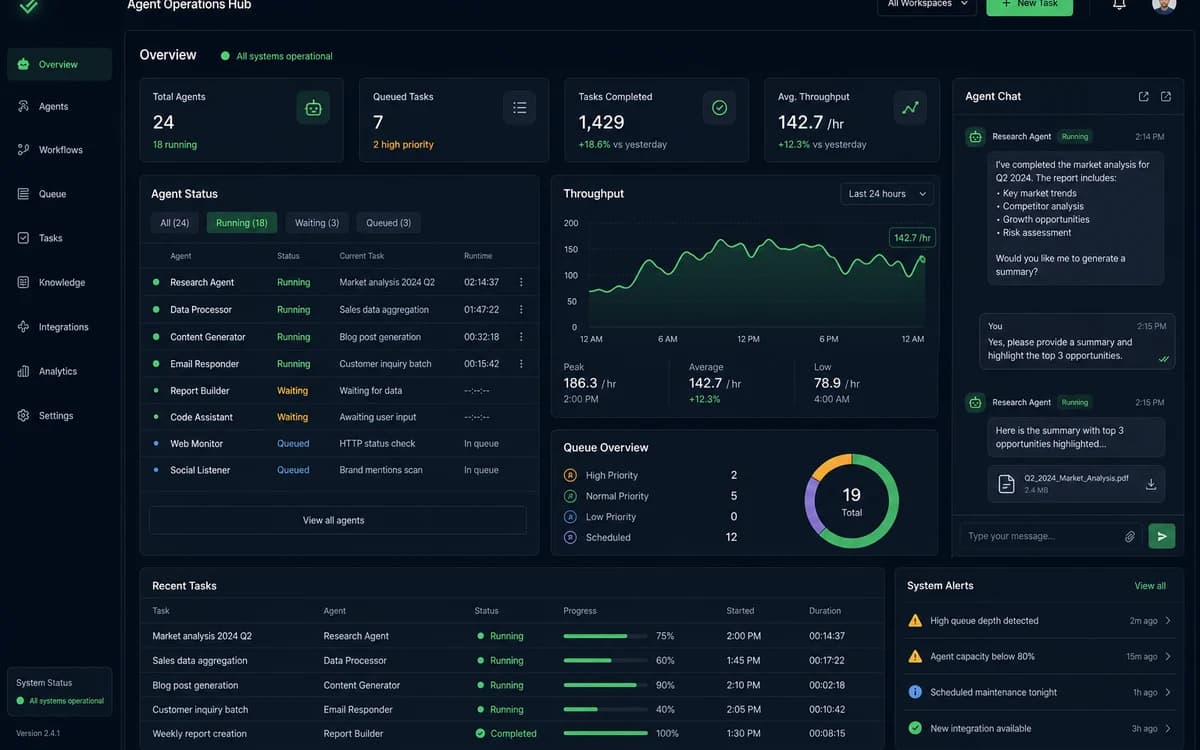
For a concrete example of multi-agent operations in production, see our case study on an AI Agent Operations Hub — 18+ hours of manual work removed per week through intake, validation, and approval automation.
Manufacturing and logistics teams use agents to reconcile shipment exceptions, match PO lines to invoices, and surface supplier delays to planners. The integration surface is ERP and WMS APIs — not flashy UI — but the hours saved are real.
Media and education companies experiment with content repurposing agents that turn webinars into drafts, summaries, and social clips. Editorial review remains mandatory; the agent accelerates first drafts and metadata tagging.
Explore our AI Agent Operations Hub case study and AI SaaS platform case study for production examples.
How to Build an AI Agent for Your Business
Building an agent that survives contact with real users is an engineering and product exercise, not a prompt experiment. The following sequence is what we use with growth-stage teams shipping their first production agent.
Start with one workflow and one success metric — hours saved, error reduction, or faster cycle time. Scope a thin vertical slice: one document type, one approval path, one integration. Ship that to a pilot group before expanding tools or autonomy.
Model the workflow as states and transitions before writing prompts. Whiteboard the happy path, failure paths, and human gates. A simple state diagram prevents agents from becoming opaque chains of LLM calls that nobody can maintain.
Define tools with strict schemas — inputs, outputs, timeouts, and idempotency. The LLM should choose among well-typed actions, not invent SQL or API shapes. Wrap legacy systems behind a narrow API layer so the agent cannot bypass business rules.
Add evaluation early: a golden set of real (anonymized) examples with expected outcomes. Run evals on every prompt or graph change. Teams that skip this step usually rediscover quality regressions in production.
Deploy with staging, feature flags, and kill switches. Roll out to internal users first, then a small customer cohort. Monitor cost per run, latency p95, escalation rate, and override frequency — overrides are free training signal.
If you want a delivery partner rather than hiring a full agent team overnight, our AI agent development service covers architecture, graph design, integrations, observability, and production rollout — from pilot to scale.
Security review should happen before pilot, not after. Map which tools touch PII, which actions are irreversible, and which roles can override the agent. Pair technical controls with training so operators know when to trust automation and when to intervene.
Documentation is part of delivery: runbooks for failed queues, owner on-call rotation, and a change process for prompts and tools. Agents without owners become fragile the moment the original builder switches projects.
Treat your first agent as a product, not a script. Roadmap integrations, define SLAs with internal users, and celebrate incremental autonomy increases rather than betting everything on full automation in week one.
See our AI agent development service for architecture, integrations, and rollout support.
- Week 1: workflow mapping, success metrics, data access review
- Weeks 2–4: tool APIs, graph or chain prototype, eval harness
- Weeks 5–6: HITL UI, audit logging, staging deployment
- Week 7+: pilot, metrics review, expand scope or harden SLAs
- Post-launch: quarterly eval refresh, access review, and cost tuning
LangGraph vs LangChain: Which Should You Use?
LangChain is a broad framework for composing LLM applications — prompts, retrievers, tool bindings, and chains. It is a strong starting point for prototypes and linear flows where each step runs once in order.
LangGraph extends that model with explicit graph state: nodes, edges, cycles, checkpoints, and durable execution. That matters when your agent must retry, branch, resume after failure, or run for minutes across multiple tools — typical in operations and back-office automation.
Choose LangChain when the job is mostly retrieve-then-generate, single-pass tool use, or a short chain without complex branching. Choose LangGraph when you need multi-agent coordination, human approval gates, long-running jobs, or visibility into which step failed.
In practice, many production systems use both: LangChain components inside LangGraph nodes. The decision is less about hype and more about whether your workflow is a pipeline or a state machine. If stakeholders draw flowcharts with diamonds for decisions, you probably need a graph.
Teams also compare custom orchestration on queues (Celery, Bull, Sidekiq) plus thin LLM steps. That can be right at high volume with simple logic — but you will rebuild checkpointing and trace UX yourself. Frameworks buy speed; custom buys control.
When evaluating LangGraph vs LangChain, run the same golden tasks through both shapes of your workflow. Compare debug time, not just lines of code. Operations teams will live in traces when something misfires at 2 a.m.
Vendor lock-in is a valid concern. Keep tool interfaces thin, store state in your database, and avoid embedding business rules only inside prompts. Portable architectures survive model and framework churn.
What Does It Cost to Build an AI Agent?
Cost splits into build, run, and maintain. Build cost depends on integrations, compliance requirements, and how messy source data is — not just model API fees.
A focused pilot agent — one workflow, two or three integrations, human review UI, basic logging — often lands in a similar range to a small product feature sprint. A multi-agent operations hub with queues, RBAC, and analytics is closer to a platform investment.
Runtime cost is driven by model choice, tokens per run, retrieval index size, and run frequency. Smaller models with good tool design routinely beat frontier models with sloppy prompts. Cache retrieval results and compress context where possible.
Ongoing maintenance includes eval updates, prompt versioning, dependency upgrades, and monitoring model drift. Budget for this monthly — agents are living systems tied to your APIs and policies.
ROI is usually clearest in ops-heavy businesses: if a workflow consumes twenty hours per week at a loaded cost of $50/hour, saving even half pays back a disciplined build quickly. Pair agent work with AI feature integration when you also need in-product copilots, search, or recommendations — not every use case needs full autonomy on day one.
Procurement should compare build vs buy vs augment carefully. Off-the-shelf automation fits narrow SaaS workflows; custom agents fit proprietary processes that are your competitive edge. Many teams blend both — commodity steps on platform tools, differentiated logic in-house or with a specialist partner.
Finance teams should model scenario costs: 2× volume next quarter, model price changes, and failure-driven rework. Agents that look cheap at pilot volume can spike if every run invokes a frontier model with huge context windows.
Pair agent work with AI feature integration when you also need in-product copilots or smart search.
- Pilot (single workflow): lower build, prove ROI before expanding
- Production hub (multi-step, multi-user): higher build, higher defensibility
- Run cost: model tier × tokens × daily volume
- Hidden cost: data cleanup, access control, and change management
Related reading
Frequently asked questions
What is the difference between an AI agent and a chatbot?
A chatbot primarily generates conversational responses. An AI agent can take actions — calling APIs, updating records, routing work, and looping until a task is done. Agents use language models for reasoning but are defined by what they can execute, not just what they can say.
Do AI agents replace employees?
In most B2B deployments, agents remove repetitive coordination work and surface better decisions faster. Humans remain accountable for approvals, exceptions, and customer relationships. The best implementations augment teams rather than eliminate roles overnight.
How long does it take to build a production AI agent?
A narrow pilot with one workflow and human review can ship in a few weeks. Broader operations hubs with multiple integrations, audit requirements, and SLAs typically take one to three months depending on data quality and internal approvals.
What tech stack is commonly used for AI agents in 2026?
Common stacks pair Python or TypeScript services with OpenAI or other LLM providers, PostgreSQL for state and audit logs, Redis for queues, LangGraph or LangChain for orchestration, and a React-based ops console for human-in-the-loop review.
Are AI agents safe to use with sensitive business data?
They can be, when designed with tenant isolation, least-privilege tool access, retrieval boundaries, encryption, and audit trails. Avoid sending regulated data to models without contractual and architectural guardrails. Production agents should log every tool input and output.
LangGraph or LangChain — which is better for enterprise workflows?
LangChain suits simpler chains and rapid prototypes. LangGraph is stronger for enterprise workflows that need branching, retries, checkpoints, and human approval gates. Many teams use LangGraph for orchestration and LangChain utilities inside nodes.
When should we hire an agency vs build in-house?
Hire or partner when speed to first production matters and your team lacks agent observability, eval, or integration experience. Build in-house when the workflow is core IP and you already have platform engineers. Hybrid models — agency for pilot, internal team for scale — are common.
What metrics prove an AI agent is working?
Track task completion rate, human override rate, average handling time, cost per successful run, error and escalation rate, and business outcomes like hours saved or faster cycle time. Review metrics weekly during pilot and monthly in steady state.
Ready to build an AI agent for your business?
Free consultation — we reply within 24 hours.